

📌 TL;DR: Nonprofit Marketing Quick Start
If you only have 5 minutes, do these 3 things:
- Test your donation page mobile speed at pagespeed.web.dev - fix if over 3 seconds
- Apply for Google Ad Grants (google.com/grants) - $10K/month free advertising
- Set up 5-email welcome automation for new donors in your email platform
If you have 30 minutes, read these sections:
- 3 Quick Diagnostics - identify what's broken
- Budget-Specific Strategies - what to do at your budget level
- 90-Day Action Plan - step-by-step implementation
If you want the complete nonprofit marketing strategy, keep reading →
Your nonprofit's posting on social media, sending emails, maybe running some ads—but can you actually prove any of it brings in donations?
If you're tracking likes and shares instead of donor acquisition cost and lifetime value, you're not alone. 73% of nonprofits can't connect marketing spend to actual revenue. They're busy. They're posting. But they aren't measuring what matters.
Here's how to fix that. You'll get budget-specific strategies (because honestly, a $5K plan looks nothing like a $50K plan), real nonprofit benchmarks instead of generic marketing stats, and a 90-day implementation roadmap that doesn't require a marketing degree. Organizations using these frameworks—like Children’s Orchestra Society—doubled fundraising in 30 days. No theory. Just tactics that actually convert supporters into donors.
What Is Nonprofit Marketing? (The No-BS Answer)
Nonprofit marketing is the strategic use of digital and traditional channels—including email, social media, SEO, and video—to attract donors, recruit volunteers, and drive measurable mission advancement. Unlike for-profit marketing that's focused solely on sales, nonprofit marketing balances awareness, relationship-building, and conversion optimization to maximize both reach and revenue.
Here's the real difference between activity and strategy. Posting three times daily? That's activity. Tracking which posts convert browsers into monthly donors? That's nonprofit marketing strategy. Running email campaigns? Activity. Measuring donor acquisition cost per campaign? Now that's marketing.
Three Outcomes That Actually Matter
1. Measurable Donor Growth Real nonprofit marketing plans track how many new donors you acquired, what it cost to acquire them, and their lifetime value. Sure, a $200 acquisition cost sounds expensive—until you realize that donor gives $1,500 over four years. That's a 7.5x return.
2. Higher Conversion Rates Your donation page gets 1,000 monthly visitors. At 2% conversion, that's 20 donors. Bump it to 4% and you've just doubled donations with zero additional traffic. That's what nonprofit marketing campaigns focus on: removing friction between interest and action.
3. Predictable Revenue Systems Stop hoping people donate. Build systems that predictably generate support. Email automation welcomes new donors. Retargeting ads re-engage website visitors. Thank-you sequences improve retention. These nonprofit marketing tactics compound monthly.
Why Your Nonprofit Marketing Isn't Working
(3 Quick Diagnostics)
Run these three checks. They'll tell you what's broken in about 15 minutes.
Diagnostic #1: The Metrics Test
Pull your last campaign report. Can you answer these?
- How much did each new donor cost to acquire?
- What's the lifetime value of donors from that channel?
- Which specific actions drove donations (not just impressions)?
Can't answer? You're tracking activity, not results. Install conversion tracking today using Google Analytics Goals or your CRM's tracking pixels.
Diagnostic #2: The Integration Test
Look at your last three marketing pieces—an email, a social post, an ad. Do they:
- Share consistent messaging about your mission?
- Drive to the same campaign or goal?
- Reinforce each other's calls-to-action?
All different messages? You're running scattered tactics, not integrated strategy. Pick one quarterly campaign and get all your channels behind it.
Diagnostic #3: The Mobile Test
On your phone right now, try donating to your organization. Time it.
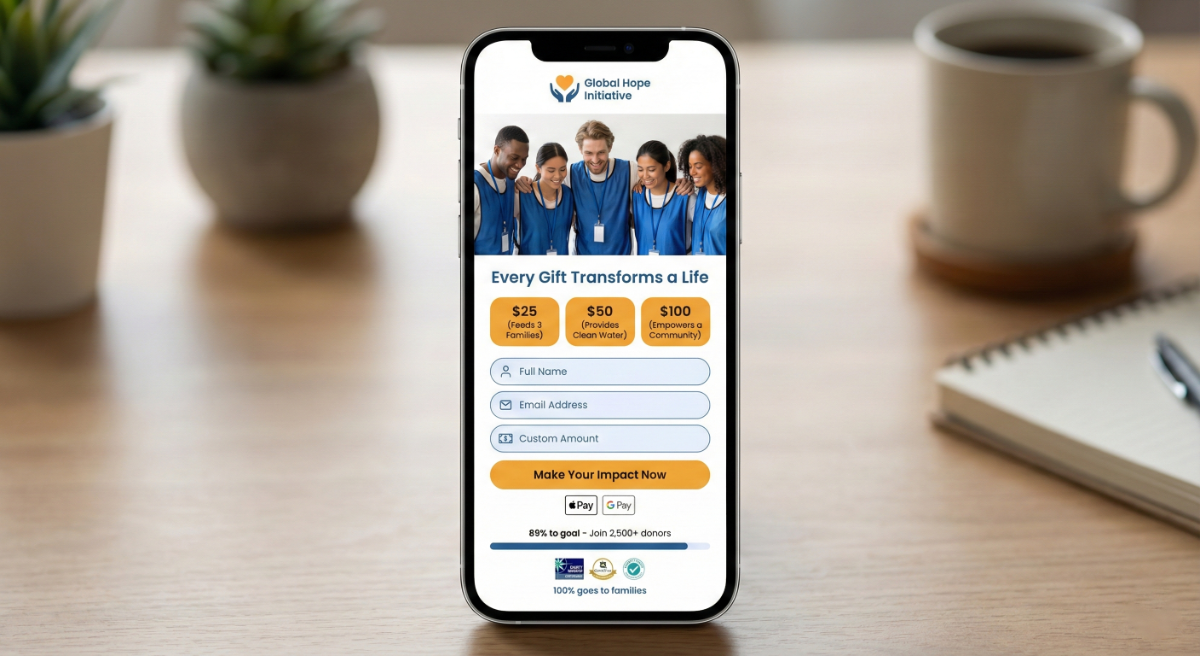
Takes over 90 seconds? You're losing 50%+ of potential mobile donors. Reduce your form to 4 fields (name, email, amount, payment) and enable Apple Pay/Google Pay.
Want a complete donation page audit? We've built a free Conversion Science Fundraising Audit Tool that walks you through 27 specific conversion points most nonprofits miss. Answer a few quick questions and get your personalized report on what's costing you donations.
The 4-Step Nonprofit Marketing Framework (Copy This)
This framework helped Children's Orchestra Society double fundraising and increase individual donations by 10-25x. Mountain Digital Marketing Group clients saw email engagement jump 65%. Copy it.
Step 1: Audience Research Beyond Demographics
Stop collecting just age and location. Start tracking behavior and motivation.
What to track:
- Psychographics: Why do they give? Fear of missing out? Desire to make local impact? Want to honor someone?
- Behavioral signals: Which emails actually get opened? What pages do they visit before donating? How long between first visit and first gift?
- Objections: What's preventing bigger gifts? Lack of trust? Unclear impact? Too many asks?
Build 3 donor personas in 2 hours:
- Survey 20 current donors (5 questions max): Why did you first give? What keeps you giving? Preferred contact method?
- Interview 3 major donors by phone (15 minutes each)
- Analyze your CRM: Which channels acquire donors with highest lifetime value?
Example persona format:
"Monthly Maya"
- Gives: $75/month
- Motivation: Local impact she can see
- Preferred channel: Email updates with photos
- Trigger: Stories about specific families helped
- Objection: Worries money doesn't reach people directly
Write emails specifically to Monthly Maya. Your nonprofit marketing campaigns should speak to 3-5 personas like this, not "everyone who cares."
Step 2: Message Architecture (One Core Story)
Your organization does 17 different things. Your marketing message should focus on one.
The One-Sentence Promise
What problem do you actually solve? Answer in 10 seconds:
❌ "We're a comprehensive social services organization providing multiple programs..."
✅ "We break the cycle of poverty through job training and placement."
❌ "We work to improve education outcomes for at-risk youth..."
✅ "We give low-income kids access to free music education."
Three Proof Points
How do you deliver that promise? Pick three strongest outcomes:
Job training example:
- Industry certifications employers actually want
- Partner companies guaranteeing interviews to graduates
- 18-month job coaching after placement (82% still employed after one year)
One Emotional Story
Facts tell, stories sell. Every nonprofit marketing campaign needs one person's journey:
"Maria was unemployed three years after her factory closed. Our welding program gave her skills. She now makes $24/hour and bought her first car at 43."
That story includes the stat (welding program) wrapped in human impact.
Step 3: The Triple Foundation System
Focus on just three channels that work together:
Foundation 1 (Your Website): Your Website
- Loads under 3 seconds on mobile (test at pagespeed.web.dev)
- Donation button visible without scrolling
- Form requires 4 fields maximum
- Includes specific impact statements: "$50 provides one week of meals"
Foundation 2 (Google Business Profile): Google Business Profile
- Complete every field (10+ photos, weekly posts, respond to all reviews)
- Optimized for "[your service] near me" searches
- Links directly to donation page, not homepage
- Posts urgency: "30 families need food this week"
Foundation 3 (Video): Video
- Post weekly (60 seconds or less)
- Show work in action, not talking heads
- Film on smartphone (authentic beats polished)
- Three types: impact stories, donor testimonials, urgent needs
When these three align, marketing compounds. Donor finds you via local search → watches video → lands on fast website → donates.
Step 4: Track 5 Core Metrics Weekly
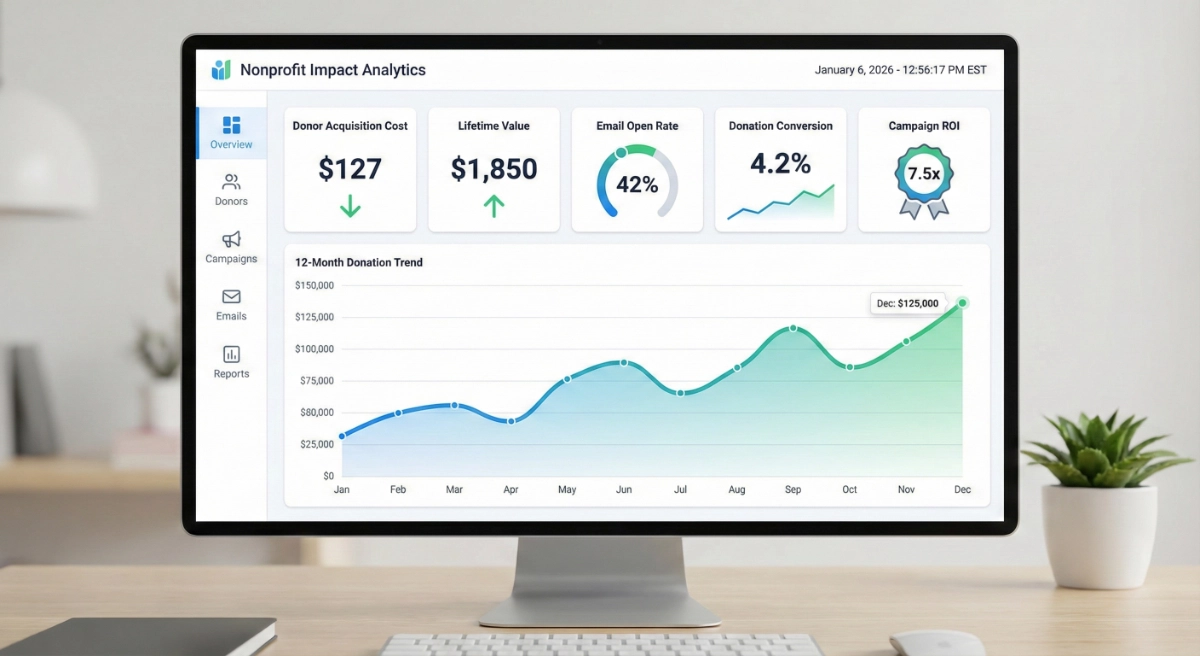
Set up a simple dashboard tracking:
| Metric | Formula | Your Target |
|---|---|---|
| Donor Acquisition Cost | Marketing spend ÷ new donors | <$200 |
| Lifetime Value | Avg gift × frequency × years | >$600 |
| Website Conversion | Donations ÷ visits × 100 | >3% |
| Email CTR | Clicks ÷ delivered × 100 | >3% |
| Campaign ROI | (Revenue - cost) ÷ cost × 100 | >200% |
Review Monday mornings. Reallocate budget to winners. Cut losers after 60 days.
7 Nonprofit Marketing Channels Ranked by ROI
(With Real Benchmarks)
Quick Reference: Which Channels to Prioritize
| Channel | Best For | Avg ROI | Difficulty | Budget Needed |
|---|---|---|---|---|
| Email Marketing | Donor retention, appeals | $42:$1 | Easy | $0-500/mo |
| Google Ad Grants | New donor acquisition | Infinite (free) | Medium | $0 |
| Video Marketing | Emotional connection | 1200% more shares | Medium | $0-2K/mo |
| Direct Mail | Major donors 50+ | 300-400% | Hard | $2K+ per campaign |
| Social Media | Awareness, community | Low direct ROI | Easy | $0-1K/mo |
| SMS Marketing | Urgent appeals, events | 45% CTR | Easy | $500+/year |
| Peer-to-Peer | Network expansion | High acquisition | Medium | $300+/year |
Now let's break down each channel with nonprofit-specific benchmarks and strategies.
1. Email Marketing
(Highest ROI: $42 per $1 Spent)
Email isn't sexy. It won't win marketing awards. But it generates more revenue per dollar than any other channel.
Why it works:
- You own the list (no algorithm controls reach)
- Supporters opted in (they want to hear from you)
- Automation scales personalization
- Easy to test and optimize
Nonprofit-specific benchmarks (2026 data):
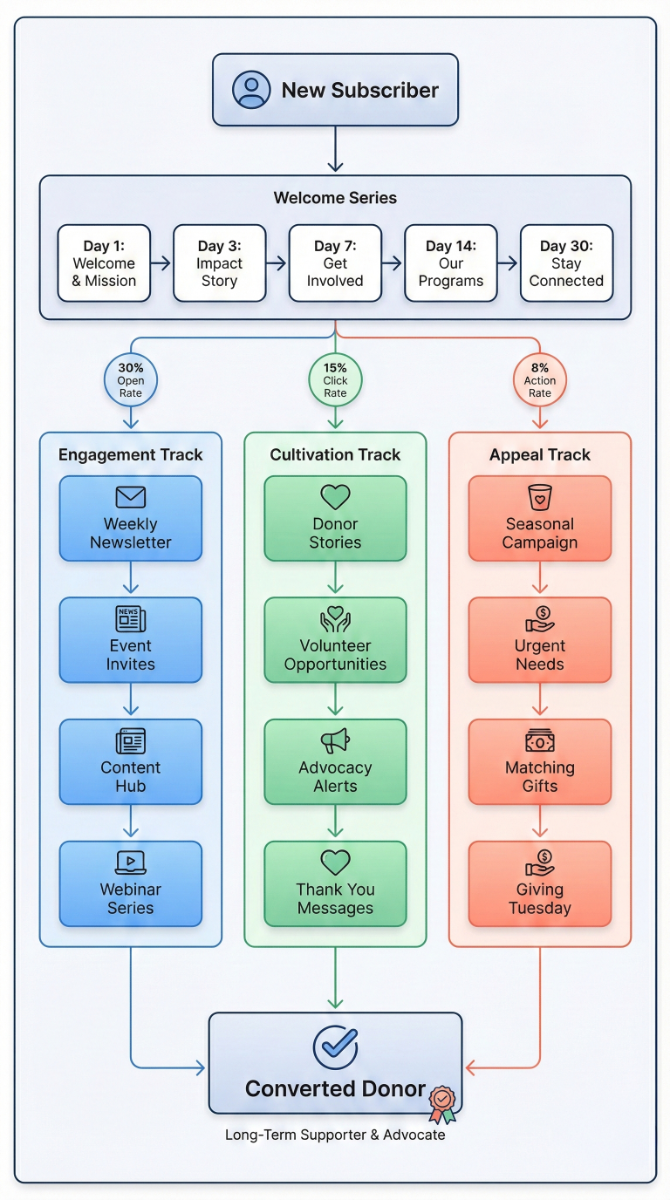
- Average open rate: 25-30%
- Average click-through rate: 2.5-4%
- Average unsubscribe rate: <0.5%
- Cost per acquisition: $75-150
What to send:
- Welcome series (3-5 emails after first donation/sign-up)
- Monthly impact updates (results, not activities)
- Urgent appeals (2-3 per year for major campaigns)
- Event promotions (6-8 weeks of lead time)
- Thank-you sequences (triggered by donation amount)
Tools by budget:
- $0-5K: Mailchimp (free up to 500 contacts)
- $5K-25K: Constant Contact or ActiveCampaign ($20-300/month)
- $25K+: HubSpot or Salesforce Marketing Cloud (enterprise pricing)
Common mistake: Sending the same email to everyone. Segment by giving level, program interest, engagement history. A monthly donor should get different content than a one-time $25 giver.
2. SEO + Google Ad Grants (Free Traffic: $10K Monthly Value)
Every month, people in your community Google "[your cause] near me" or "how to help [your issue]" or "donate to [your mission]." Are you showing up?
Google Ad Grants give qualified nonprofits $10,000/month in free search advertising. That's $120K annually in free traffic to your donation page.
Why it works:
- High intent traffic (they're actively searching)
- Free clicks (Ad Grants covers cost)
- Local targeting (reach your community)
- Measurable ROI (track conversions directly)
Nonprofit-specific benchmarks:
- Ad Grant click-through rate: 2-5%
- Conversion rate from Ad Grant traffic: 1-3%
- Average cost per conversion: $0 (it's free)
- Organic SEO conversion rate: 2-4%
What to do:
- Claim your Ad Grant at google.com/grants (requires 501(c)(3) status)
- Target "intent" keywords: "[cause] donation," "[service] near me," "volunteer for [mission]"
- Send clicks to dedicated landing pages, not homepage
- Write compelling ad copy with clear CTAs
- Optimize for required 5% click-through rate
Tools by budget:
- $0-5K: DIY using Google's free training + Ad Grant support
- $5K-25K: Agency management ($500-1,500/month) or freelancer
- $25K+: Full SEO strategy including content, technical optimization, link building
Common mistake: Sending Ad Grant traffic to your homepage. Create specific landing pages for each campaign with one clear call-to-action.
3. Social Media Marketing (Awareness + Engagement)
Let's be real: organic social media doesn't drive significant direct donations anymore. Facebook's algorithm shows your posts to 2-5% of followers. Instagram's even worse.
But social media still matters for awareness, community building, and amplifying campaigns.
Why it works (when done right):
- Brand visibility among target demographics
- Storytelling through visual content
- Community engagement and retention
- Amplification of major campaigns
Nonprofit-specific benchmarks by platform:
Facebook:
- Organic reach: 2-5% of followers
- Engagement rate: 0.5-1%
- Ad cost per click: $0.50-2.00
- Best for: Donors 35+, event promotion, community building
Instagram:
- Organic reach: 3-7% of followers
- Engagement rate: 1-3%
- Best for: Visual storytelling, volunteer recruitment, younger donors
LinkedIn:
- Organic reach: Higher than Facebook for organization pages
- Engagement rate: 2-4%
- Best for: B2B partnerships, corporate giving, professional volunteers
TikTok:
- Organic reach: Can be exponential if content resonates
- Engagement rate: 5-10% (highest of all platforms)
- Best for: Reaching Gen Z donors, viral awareness campaigns
What actually works in 2026:
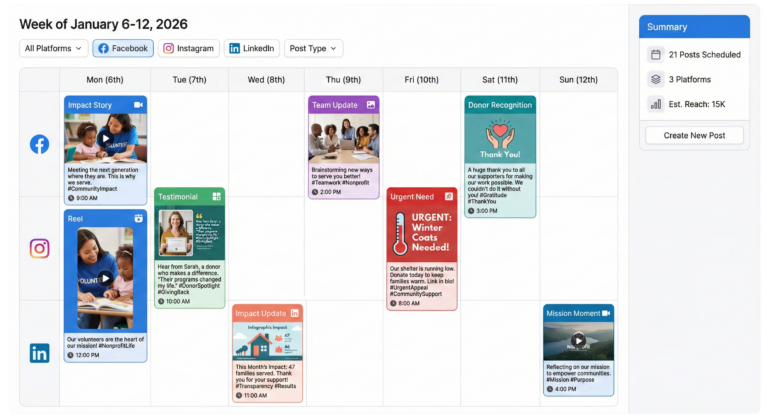
- Short-form video (60 seconds or less)
- Behind-the-scenes content showing real work
- Donor/beneficiary testimonials
- Live video from events or programs
- User-generated content (supporters sharing their involvement)
Tools by budget:
- $0-5K: Native platform tools + Canva for graphics
- $5K-25K: Later or Buffer for scheduling ($15-50/month) + paid social ads ($500-1,000/month)
- $25K+: Full social media management + content production
Common mistake: Trying to be everywhere. Pick 2 platforms where your donors actually spend time. Master those before expanding.
4. Video Marketing (1,200% More Shares Than Static Content)
Remember that uncomfortable stat? 90% of nonprofits aren't using video consistently. Which means 90% of your competitors just handed you an advantage.
Video creates emotional connections faster than any other medium. Donors process visual and auditory information simultaneously, creating stronger memory formation and emotional response.
Why it works:
- Emotional storytelling at scale
- Higher engagement across all platforms
- Repurposable content (one long video → 10 shorts)
- Mobile-first consumption (where your audience is)
Nonprofit-specific benchmarks:
- Video posts get 1,200% more shares than text + images
- Viewers retain 95% of message in video vs. 10% in text
- Donation pages with video convert 80% higher
- Average watch time on nonprofit videos: 45-60 seconds
Video types that convert:
Impact Stories (60-90 seconds): Show your work changing lives. Real people. Real outcomes. Film on phone if needed.
Donor Testimonials (30-45 seconds): Why do supporters give? Let them explain in their own words.
Urgent Appeals (60 seconds): Executive director or founder explaining immediate need. Direct ask.
Behind-the-Scenes (15-30 seconds): Instagram Stories and TikTok content showing your team in action.
Annual Impact (2-3 minutes): Year-end summary of outcomes. Perfect for major donor stewardship.
Tools by budget:
- $0-5K: iPhone + free editing apps (CapCut, iMovie)
- $5K-25K: Entry-level production ($1,500-3,000 per video)
- $25K+: Professional production partnership with monthly retainer
Common mistake: Waiting for "perfect" video. Authentic beats polished. Post consistently over perfection.
5. Direct Mail (90% Open Rate When Done Right)
Email inboxes are crowded. Social media is noise. But physical mail? People still open it.
Direct mail has the highest open rate of any channel. And when integrated with digital (QR codes, personalized URLs, follow-up emails), it drives serious ROI.
Why it works:
- Physical presence creates higher engagement
- Older donors (50+) prefer it
- No algorithm deciding who sees your message
- Tangible reminder they can keep
Nonprofit-specific benchmarks:
- Open rate: 80-90%
- Response rate: 2-5% (higher for existing donors)
- Average gift from direct mail: $100-250
- ROI: 300-400% for established lists
What to send:
- Acquisition mailings to new prospects (bought/rented lists)
- Appeal letters to existing donors (2-4 per year)
- Thank-you cards (for gifts over $250)
- Annual reports (for major donors)
- Event invitations
Cost breakdown:
- Design: $500-1,500 (reusable templates reduce ongoing cost)
- Printing: $0.25-0.75 per piece
- Postage: $0.66-0.73 (nonprofit rate)
- List rental: $0.10-0.25 per name (acquisition only)
For 1,000-piece mailing: $1,200-2,500 total
Tools by budget:
- $0-5K: Not realistic for direct mail (minimum $1,200 per campaign)
- $5K-25K: 2-3 mailings per year to warm list
- $25K+: Consistent quarterly mailings + acquisition campaigns
Common mistake: Sending bland "annual appeal" letters. Tell one story. Make one ask. Include specific impact.
6. SMS/Text Marketing (45% Click-Through Rate for Nonprofits)
Text messages have the highest open rate (98%) and fastest response time (90 seconds average) of any channel. But they're intrusive if misused.
Why it works:
- Immediate delivery and opens
- Mobile-first (where people actually are)
- Perfect for time-sensitive campaigns
- High engagement for younger donors
Nonprofit-specific benchmarks:
- Open rate: 98%
- Click-through rate: 45% (vs. 2.5% for email)
- Response time: 90 seconds average
- Opt-out rate: 2-5% (higher than email, so respect the channel)
What to send:
- Event reminders (day-of and 1-hour warnings)
- Urgent appeals (natural disaster response, matching gift deadlines)
- Thank-you messages (immediately after donation)
- Volunteer shift confirmations
- Giving Tuesday campaigns
What NOT to send:
- Weekly updates (too frequent)
- Long messages (keep under 160 characters)
- Generic fundraising asks (save for urgent needs)
Tools by budget:
- $0-5K: Not recommended (entry cost ~$500/year)
- $5K-25K: CallHub or Hustle ($500-1,500/year)
- $25K+: Full SMS integration with CRM
Common mistake: Treating texts like emails. Keep it short. One link max. Clear CTA.
7. Peer-to-Peer Fundraising (Multiplies Donor Acquisition)
Your supporters have networks you can't reach. Peer-to-peer fundraising activates those networks by empowering donors to fundraise on your behalf.
Why it works:
- Social proof from trusted sources (their friends, not you)
- Expands reach beyond existing list
- Turns donors into ambassadors
- Younger donors prefer this model
Nonprofit-specific benchmarks:
- Average peer fundraiser raises: $250-500
- Conversion rate (participants who actually fundraise): 40-60%
- Average donor gift to peer campaign: $50-75
- New donor acquisition: 30-40% are first-time to organization
Campaign types:
- Birthday fundraisers (Facebook makes this easy)
- Run/walk events (classic model)
- DIY fundraising (supporters create their own campaigns)
- Giving Tuesday team challenges
Tools by budget:
- $0-5K: Facebook Birthday Fundraisers (free)
- $5K-25K: Classy or Givebutter ($300-1,000/year)
- $25K+: Custom peer-to-peer platform with team features
Common mistake: Launching peer-to-peer without training fundraisers. Give them email templates, social post examples, and personal coaching. Fundraisers need support.
Nonprofit Marketing Strategies by Budget: $0-5K, $5K-25K, $25K+
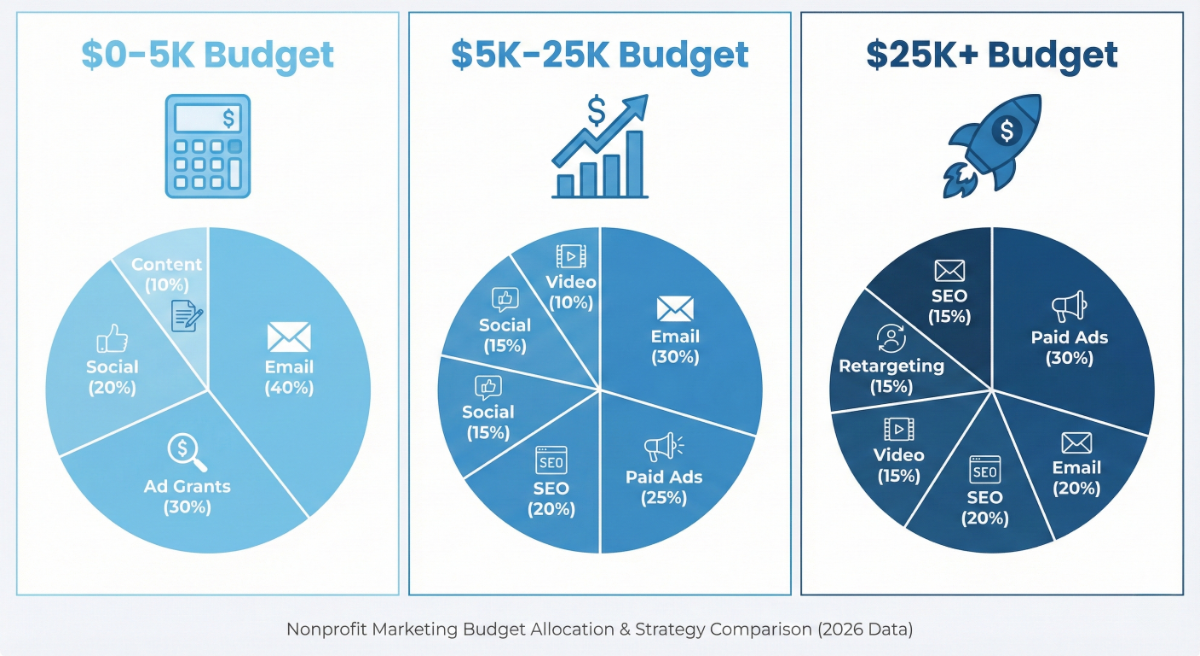
The right strategy at $5K looks completely different than at $50K. Here's what to prioritize at each level.
Tier 1: $0-5,000 Annual Budget
Reality check: You're probably solo. One person doing everything. Every dollar matters.
Your 3 Priority Channels:
- Email marketing (Mailchimp free up to 500 contacts)
- Google Ad Grants ($10K/month free ads)
- Organic social (2 platforms max)
Quick Wins This Quarter:
Month 1:
- Set up Mailchimp free account
- Apply for Google Ad Grant (takes 2-4 weeks)
- Pick 2 social platforms (where your donors actually are)
- Speed test donation page (target: under 3 seconds mobile)
Month 2:
- Build email list to 100+ (website popup + social promotions)
- Write 4 email templates (welcome, appeal, update, thank-you)
- Film 3 smartphone videos (60 seconds each, impact stories)
- Set up Google Analytics conversion tracking
Month 3:
- Launch first email campaign
- Review Ad Grant performance (cut non-converting keywords)
- Test subject lines (A/B test with 20% of list)
- Analyze what's working, double down on winners
Free Tools Stack:
- Email: Mailchimp (free tier)
- Social: Later or Buffer (free tier)
- Design: Canva (free)
- Video: CapCut or iMovie (free)
- Analytics: Google Analytics (free)
- Donations: Facebook Donate or PayPal Giving Fund (no fees)
Total Annual Cost: $0-300
Expected Results by Month 12:
- 300-500 email subscribers
- 2,000-4,000 monthly website visits (Google Ad Grant)
- 12-18% increase in online donations
- Data proving which channels work for Year 2 budget
Common Mistake: Trying to be on every platform. Focus beats scattered. Pick 3 channels and do them consistently.
Tier 2: $5,000-25,000 Annual Budget
Reality check: You have breathing room. Maybe part-time help or consistent funding. Time to scale what works.
Your 5 Priority Channels:
- Email with automation
- Google Ad Grants + SEO
- Paid social ads ($500-1K/month)
- Video (quarterly professional production)
- Direct mail (2 campaigns/year)
12-Month Roadmap:
Q1: Upgrade Infrastructure
- Move to ActiveCampaign or Constant Contact ($100-250/month)
- Hire SEO freelancer for site audit ($500-1,000 one-time)
- Launch Facebook/Instagram ads ($500/month)
- Install heatmap tracking (Hotjar free tier)
Q2: Create Core Assets
- Hire videographer for 2-3 impact videos ($3,000-5,000)
- Design direct mail template ($1,000)
- Build 5-email welcome automation
- Create lead magnet (free guide/checklist to grow list)
Q3: Test & Optimize
- Run first direct mail to warm list ($2,000-3,000 for 1,000 pieces)
- A/B test ad audiences and creative
- Test donation form variations
- Analyze data, reallocate budget to winners
Q4: Scale Winners
- Double investment in best-performing channels
- Send direct mail to responders only
- Increase ad spend on positive ROI campaigns
- Plan Year 2 based on actual performance data
Budget Breakdown ($15,000 example):
- Email platform: $1,200/year
- Video production: $4,000/year
- Paid social ads: $6,000/year
- Direct mail: $4,000/year (2 campaigns)
- SEO/tools: $2,000/year
Expected Results by Month 12:
- 1,500-3,000 email subscribers
- 6,000-10,000 monthly website visits
- 30-50% increase in online donations
- 5-8 new monthly donors
- Clear ROI data for each channel
Common Mistake: Spreading budget too thin across 8 channels. Focus on 4-5 max.
Tier 3: $25,000+ Annual Budget
Reality check: You're established with a team or agency partnership. Time for integrated systems that scale.
Your Full-Stack Approach:
- Integrated CRM + marketing automation
- Professional creative production (monthly)
- Multi-channel paid media
- Agency partnership or full-time hire
- Advanced testing and optimization
12-Month Strategy:
Q1: Build Systems
- Set up HubSpot or Salesforce ($300-600/month)
- Hire agency or full-time marketing manager
- Set up advanced dashboards (Data Studio)
- Create annual content calendar with campaign themes
Q2: Professional Production
- Monthly video content (4-6 videos/month)
- Quarterly direct mail campaigns
- Consistent paid media across platforms
- Launch peer-to-peer fundraising campaign
Q3: Advanced Testing
- A/B test everything (emails, pages, ads, mail)
- Launch retargeting campaigns
- Test acquisition vs retention spend ratios
- Optimize donor journey touchpoints
Q4: Scale & Automate
- Automate all proven campaigns
- Scale winning channels with 50% budget increase
- Build repeatable playbooks
- Forecast Year 2 revenue based on performance
Budget Allocation ($50,000 example):
- Agency/staff: $24,000/year
- CRM/email: $6,000/year
- Video production: $12,000/year
- Paid media: $18,000/year
- Direct mail: $8,000/year (4 campaigns)
- SEO/content: $6,000/year
- Design: $4,000/year
- Tools/software: $2,000/year
Expected Results by Month 12:
- 5,000-10,000 email subscribers
- 20,000-30,000 monthly website visits
- 60-100% increase in online donations
- 20-30 new monthly donors
- Predictable donor acquisition systems
- Clear multi-touch attribution
Common Mistake: Getting fancy before basics are nailed. Simple tested campaigns beat complex untested ones even at this budget.
5 Nonprofit Marketing Metrics That Actually Matter
Track these five weekly. Ignore everything else until these are dialed in.
1. Donor Acquisition Cost (What Each New Donor Costs You)
Formula: Marketing spend ÷ new donors acquired
Track it: Tag every new donor with source in your CRM. Monthly, divide channel costs by new donors from that channel.
Benchmark: $100-300 for most nonprofits
Example: Spent $2,000 on Facebook ads, got 15 new donors = $133 per donor
Why it matters: Can't know if marketing is profitable without knowing acquisition cost.
2. Lifetime Donor Value (What Each Donor Is Worth Long-Term)
Formula: Average donation × gifts per year × years retained
Track it: Calculate average for donors acquired 2-3 years ago to see actual retention.
Benchmark: $400-1,200 depending on channel
Example: $75 average × 3 gifts/year × 4 years = $900 lifetime value
Why it matters: A $150 acquisition cost looks cheap when that donor gives $900 total.
3. Website Conversion Rate (Are Visitors Actually Donating?)
Formula: Donations ÷ donation page visits × 100
Track it: Google Analytics Goals on donation confirmation page.
Benchmark: 1-3% average, 5%+ excellent
Example: 1,000 page visits, 30 donations = 3% conversion rate
Why it matters: Improve from 2% to 3% = 50% more donations with same traffic.
Quick Fix: Reduce form to 4 fields, add Apple Pay/Google Pay, show "$50 provides..." impact.
4. Email Click-Through Rate (Are People Taking Action?)
Formula: Clicks ÷ emails delivered × 100
Track it: Your email platform reports this automatically.
Benchmark: 2.5-4% for nonprofits
Example: 5,000 sent, 150 clicks = 3% CTR
Why it matters: Opens don't pay bills. Clicks to donation page do.
Quick Fix: Test subject lines with curiosity or urgency. Include one clear CTA per email.
5. Monthly Recurring Revenue (Your Most Stable Income)
Formula: Sum of all monthly donor commitments
Track it: Count monthly donors × average monthly gift in your CRM.
Benchmark: Should grow 10-20% quarterly
Example: 50 monthly donors × $75 average = $3,750 MRR
Why it matters: Monthly donors have 5x higher lifetime value than one-time donors.
Quick Fix: Add monthly option to donation forms. Ask one-time donors to switch to monthly at 6-month mark.
Simple Tracking Dashboard (Use This):
| Metric | This Month | Last Month | Change |
|---|---|---|---|
| Donor Acquisition Cost | $ | $ | % |
| New Monthly Donors | # | # | % |
| Website Conversion | % | % | % |
| Email CTR | % | % | % |
| Monthly Recurring Revenue | $ | $ | % |
Review every Monday. Reallocate budget to what's improving.
Your First 90 Days: Nonprofit Marketing Plan That Works
This nonprofit marketing plan shows exactly what to do, when, and how long it takes. Follow this and you'll have working systems in 3 months.
Days 1-30: Foundation (Audit + Goals + Quick Wins)
Week 1: Audit Current Performance (3 hours total)
Pull your baseline data:
- Last 6 months fundraising by source (CRM report: 1 hour)
- Website analytics - visitors, bounce rate, donation conversion (Google Analytics: 30 minutes)
- Email stats - opens, clicks, list growth (email platform: 30 minutes)
- Social engagement rates, not followers (native analytics: 30 minutes)
- List all marketing tools and their costs (spreadsheet: 30 minutes)
Deliverable: One-page baseline document showing where you're today.
Week 2: Set 3 Measurable Goals (1 hour)
Pick nonprofit marketing goals that matter:
Good goals:
- Acquire 100 new email subscribers by March 31
- Improve donation page conversion from 1.8% to 3% by June 30
- Add 15 new monthly donors by December 31
- Increase donor retention from 38% to 45% in 12 months
Bad goals:
- "Grow our social media presence"
- "Increase awareness"
- "Engage more supporters"
Deliverable: 3 specific goals with current baseline and target number.
Week 3: Fix Website Basics + Claim Ad Grant (2-3 hours)
Apply for Google Ad Grant (15 minutes):
- Go to google.com/grants
- Requires 501(c)(3) status
- Takes 2-4 weeks to process
While waiting, fix donation page (2-3 hours):
- Test mobile speed at pagespeed.web.dev (5 minutes)
- If over 3 seconds, compress images and remove unused plugins (1-2 hours)
- Reduce donation form to 4 fields max (30 minutes)
- Add "$50 provides..." impact statements (30 minutes)
- Ensure donate button is visible without scrolling (15 minutes)
Deliverable: Donation page that loads in under 3 seconds and has clear impact language.
Week 4: Install Tracking + Choose Channels (2 hours)
Set up analytics (1 hour):
- Install Google Analytics if not present
- Configure donation page as conversion goal
- Set up UTM parameter system for link tracking
- Install Facebook Pixel (even if not running ads yet)
Choose 2-3 channels based on your donors (1 hour):
- Review where current donors came from
- Research where similar nonprofits succeed
- Pick channels you can post to 3x weekly minimum
Deliverable: Working analytics + confirmed channel focus for next 90 days.
Days 31-60: Build (Automation + Content + Testing)
Week 5: Create Donor Personas (3 hours)
Interview 10 current donors (2 hours):
- Why did you first give?
- What keeps you giving?
- Preferred contact method?
- What impact matters most?
Build 3 personas (1 hour):
- Name them
- Document motivations
- Note preferred channels
- Identify objections
Deliverable: 3 documented personas guiding all content.
Week 6: Launch Email Automation (4 hours)
Build welcome series (3 hours):
- Email 1 (Day 0): Thank you + next steps
- Email 2 (Day 3): Founder story
- Email 3 (Day 7): Impact story
- Email 4 (Day 14): Behind-the-scenes
- Email 5 (Day 30): Second gift invitation
Set up thank-you triggers (1 hour):
- $1-49: Automated email
- $50-249: Automated + personal note from ED
- $250+: Phone call + email
Deliverable: Functioning automation that runs on autopilot.
Week 7: Optimize Donation Experience (3 hours)
Run 5-second test:
- Ask 3 people unfamiliar with your site to donate
- Time them
- Target: Under 90 seconds to complete
Pro tip: Use our free Conversion Science Fundraising Audit Tool to check all 27 donation page conversion points, not just load speed and form length. Answer a few questions and get your personalized report.
Make improvements:
- Remove navigation from donation page (30 minutes)
- Add trust signals - ratings, testimonials (1 hour)
- Set suggested giving amounts (30 minutes)
- Enable Apple Pay / Google Pay (30 minutes)
- Test on multiple devices (30 minutes)
Deliverable: Streamlined donation experience that converts.
Week 8: Create Content Calendar (2 hours)
Plan next 60 days across all channels:
Email (2-4x monthly):
- Impact stories (50%)
- Urgent needs (20%)
- Behind-the-scenes (20%)
- Donor spotlights (10%)
Social (3-5x weekly):
- Share impact stories
- Show work in progress
- Highlight supporters
- Make urgent asks
Video (1-2x monthly):
- 60-second smartphone videos
- Focus on outcomes, not process
Deliverable: 60-day content calendar with specific posts planned.
Days 61-90: Optimize (Test + Analyze + Scale)
Week 9: A/B Test One Element (Ongoing, 1 hour weekly)
Pick highest-traffic element to test:
Options:
- Email subject lines (curiosity vs. urgency)
- Donation page headline
- Button text ("Donate" vs. "Make Impact")
- Suggested giving amounts
- Form length (4 fields vs. 6 fields)
Process:
- Run test minimum 2 weeks or 100 conversions
- Document winner
- Set up
- Test next element
Deliverable: One completed A/B test with documented lift.
Week 10: Analyze Channel Performance (2 hours)
Pull 90-day data for each channel:
| Nonprofit Marketing Channel | Cost | New Donors | Cost Per Donor | Revenue | ROI |
|---|---|---|---|---|---|
| Email campaigns | $150 | 8 | $18.75 | $2,400 | 1,500% |
| Google Ad Grants | $0 | 12 | $0 | $1,800 | Infinite |
| Facebook ads | $900 | 6 | $150 | $900 | 0% |
| Direct mail | $2,500 | 22 | $114 | $8,800 | 252% |
Identify:
- Which channels have positive ROI?
- Which need more time or adjustment?
- Which should be cut?
Deliverable: Performance report showing winners and losers.
Week 11: Scale What Works (1-2 hours)
Based on Week 10 analysis:
If email is winning: Add 2 campaigns monthly, grow list faster, test new segments
If Google Ads is winning: Expand keyword list, increase daily budget, test new ad copy
If social is winning: Increase posting frequency, test paid promotion, create more video
If direct mail is winning: Plan next campaign, expand mailing list, test new creative
Deliverable: Specific plans to 2x investment in winning channels.
Week 12: Cut Losers + Plan Quarter 2 (2 hours)
Be ruthless about nonprofit marketing strategies that don't work:
Cut if:
- Negative ROI after 90 days of good effort
- No engagement despite consistent posting
- Requires more time than results justify
Keep if:
- Shows positive trend even if not profitable yet
- Supports conversion in other channels (retargeting)
- Building community that converts long-term
Plan Q2 (next 90 days):
- Document what worked
- Set new revenue targets
- Allocate budget based on Q1 performance
- Identify 2-3 new tests to run
Deliverable: Q2 nonprofit marketing plan based on real performance data.
5 Costly Nonprofit Marketing Mistakes (Fix These Now)
Mistake #1: Scattered Efforts Across Too Many Platforms
The problem: You're on Facebook, Instagram, Twitter, LinkedIn, TikTok, and YouTube. Posting inconsistently everywhere. Getting results nowhere.
The cost: Algorithms reward consistency. Posting once weekly per platform means you're invisible. Staff time wasted across 6 platforms instead of building momentum on 2.
The fix: Pick 2 platforms where your donors actually spend time. Post 3-5x weekly with consistent messaging. Master these before adding a third.
Choose based on your audience:
- Donors 50+: Facebook + Email
- Donors 25-40: Instagram + Email
- Corporate partnerships: LinkedIn + Email
- Gen Z focus: TikTok + Email
Mistake #2: Mobile-Hostile Donation Experience (Losing 60% of Traffic)
The problem: Your donation page takes 8 seconds to load on mobile. Form has 12 fields. No Apple Pay or Google Pay. Result: 60% of visitors bounce.
The cost: For nonprofits raising $100K online annually, poor mobile experience costs $30,000-50,000 in lost donations.
The fix (30 minutes):
- Test mobile speed at pagespeed.web.dev (target under 3 seconds)
- Reduce form to 4 fields: name, email, amount, payment
- Enable one-click payment options
- Increase button size to 44×44 pixels minimum
Expected result: 30-50% increase in mobile conversions within 30 days.
Mistake #3: No Thank-You Automation (Killing 70% First-Year Retention)
The problem: New donor gives $50. Gets generic automated email. No follow-up. No welcome series. No impact update. They forget about you and never give again.
The cost: Average first-year retention is 20-30%. You're losing 70-80% of donors you paid to acquire. If you spent $15,000 acquiring 100 donors and lose 80, that's $12,000 wasted.
The fix (2 hours to set up):
5-email welcome series over 30 days:
- Day 0: Thank you + what happens next
- Day 3: Founder story + mission
- Day 7: Impact story showing outcomes
- Day 14: Behind-the-scenes at your organization
- Day 30: Invitation to give again or upgrade to monthly
Expected result: First-year retention jumps from 25% to 45-50%. That $15,000 acquisition investment now yields $6,750 in Year 2 instead of $3,750.
Mistake #4: Prioritizing Acquisition Over Retention
The problem: You spend 80% of budget acquiring new donors, 20% keeping existing ones. Every year you rebuild your donor base from scratch because retention is 35%.
The math of why this fails:
- New donor acquisition: $150 each
- Retention cost: $30 each
- You're spending 5x more on the expensive option
Better allocation example:
Old way (80/20 split on $100K budget):
- $80K acquisition = 533 new donors
- Poor retention (35%) = keep 1,050 of existing 3,000
- Year-end total: 1,583 donors
Smart way (60/40 split):
- $60K acquisition = 400 new donors
- Better retention (50% from increased investment) = keep 1,500 of 3,000
- Year-end total: 1,900 donors (20% more)
The fix: Shift budget to 60% retention, 40% acquisition. Invest in welcome series, quarterly impact updates, appreciation events, and upgrade campaigns.
Mistake #5: No Consistent Video Strategy (90% Competitor Gap)
The problem: You avoid video because it seems expensive or complicated. Meanwhile, video generates 1,200% more shares than static content and increases donation page conversion by 80%.
The cost: For organizations with 10,000 annual donation page visits at 2% conversion (200 donors × $100 = $20,000), adding video could generate 160 additional donations = $16,000.
The fix (start this week):
Three videos you can film on smartphone this week:
- Donor testimonial (30 seconds): "Why do you support us?" Film their answer.
- Impact story (60 seconds): Show your work in action. Client receiving help. Student learning. Family benefiting.
- Urgent need (60 seconds): Executive director looks at camera, explains immediate need, asks for support.
Posting schedule: One 60-second video per week. Post to website, social media, email campaigns.
Expected result: 25-40% increase in social engagement, 30-50% boost in email click-through rates, 50-80% improvement in donation page conversion when video is present.
Stop Guessing. Start Converting. (Your Next Steps)
Most nonprofits treat marketing like guessing. Post something. Send an email. Hope someone donates.
That's not a nonprofit marketing strategy—that's expensive hope.
You now have the framework that helped Children's Orchestra Society double fundraising and increase individual donations by 10-25x. The difference between hoping and winning is measurement + action.
Your one action for tomorrow morning (pick one):
If you have zero marketing system: → Set up Google Analytics conversion tracking on your donation page (30 minutes) → Apply for Google Ad Grants at google.com/grants (15 minutes) → Create Mailchimp free account and add first 50 contacts (45 minutes)
If you have basic marketing but no results: → Mobile speed test your donation page at pagespeed.web.dev - fix if over 3 seconds (1-2 hours) → Set up 5-email welcome automation for new donors (2 hours) → Pull last 90 days of data and fill out the metrics dashboard above (1 hour)
If you have systems but want to scale: → Audit budget allocation - shift toward 60/40 retention/acquisition (30 minutes) → Create 3 donor personas from top 20% of lifetime value donors (2 hours) → Film three 60-second videos on your smartphone this week (3 hours total)
Still feeling stuck? Mountain Digital Marketing Group specializes in nonprofit marketing using our Conversion Science™ methodology. We've helped organizations increase fundraising by 69%, grow enrollment by 40%, and generate 65% higher email engagement.
Get a free marketing audit: We'll analyze your nonprofit marketing plan, identify exactly where you're losing conversions, and show you the fastest path to results. No obligation—just actionable insights you can use immediately.